Booko imports reading notes from WeRead, Apple Books, Kindle, Dedao, Douban Read, and iReader. Depending on the source, connect the app, paste exported note text, or select a file. Follow the steps below for each platform. On iPhone and iPad, start from the add button in the bottom bar. On Mac, use the add button in the toolbar.
Apple Books
- Open the book in Apple Books and tap ··· in the bottom-right corner.
- Choose Bookmarks & Highlights, then select the highlights you want.
- Share them to Mail.
- In the email, select all and copy.
- Go back to Booko, tap the add button, paste, and save.
Kindle
Booko supports both HTML notebooks exported from the Kindle app and My Clippings.txt from a Kindle device.
Kindle app: HTML
- Open a book in the Kindle app and go to its notes and highlights.
- Share or export the notebook as an HTML file.
- Save the HTML to Files from the share sheet or email attachment.
- In Booko, tap the add button, choose Kindle, select the Kindle App · HTML option, and choose the saved file.
On Mac: save the exported HTML file, then choose Import from File in Booko and select it.
Kindle device: TXT
A Kindle device saves all your highlights in a file called My Clippings.txt.
On iPhone or iPad:
- Connect your Kindle to a computer with a cable.
- Find
My Clippings.txtin the Kindle’s documents folder. - AirDrop the file to your iPhone or iPad and choose Save to Files.
- In Booko, tap the add button, choose Kindle, and select the file.
On Mac: connect your Kindle to your Mac, choose Import from File in Booko, and select My Clippings.txt.
WeRead
Connect and import in bulk
After you connect the WeRead Skill, Booko lists the WeRead books that have notes. Pick the books you want and import them at once.
- Get your API key in either of these ways:
- In the WeRead app, open Settings → WeRead Skill and copy the API key.
- On a computer, open the WeRead Skill page, sign in to WeRead, and copy the API key.
- In Booko, tap the add button and choose WeRead.
- Paste the API key, read the notice, and confirm.
- Select the books you want, then tap Import.
The API key stays on your device and is never sent to a Booko server. Booko is an independent app and not an official WeRead product. Disconnecting deletes the key from your device and keeps the books and notes you already imported.
During the import, Booko can look up book covers through WeRead. It sends only the title and author for this.
Copy and paste
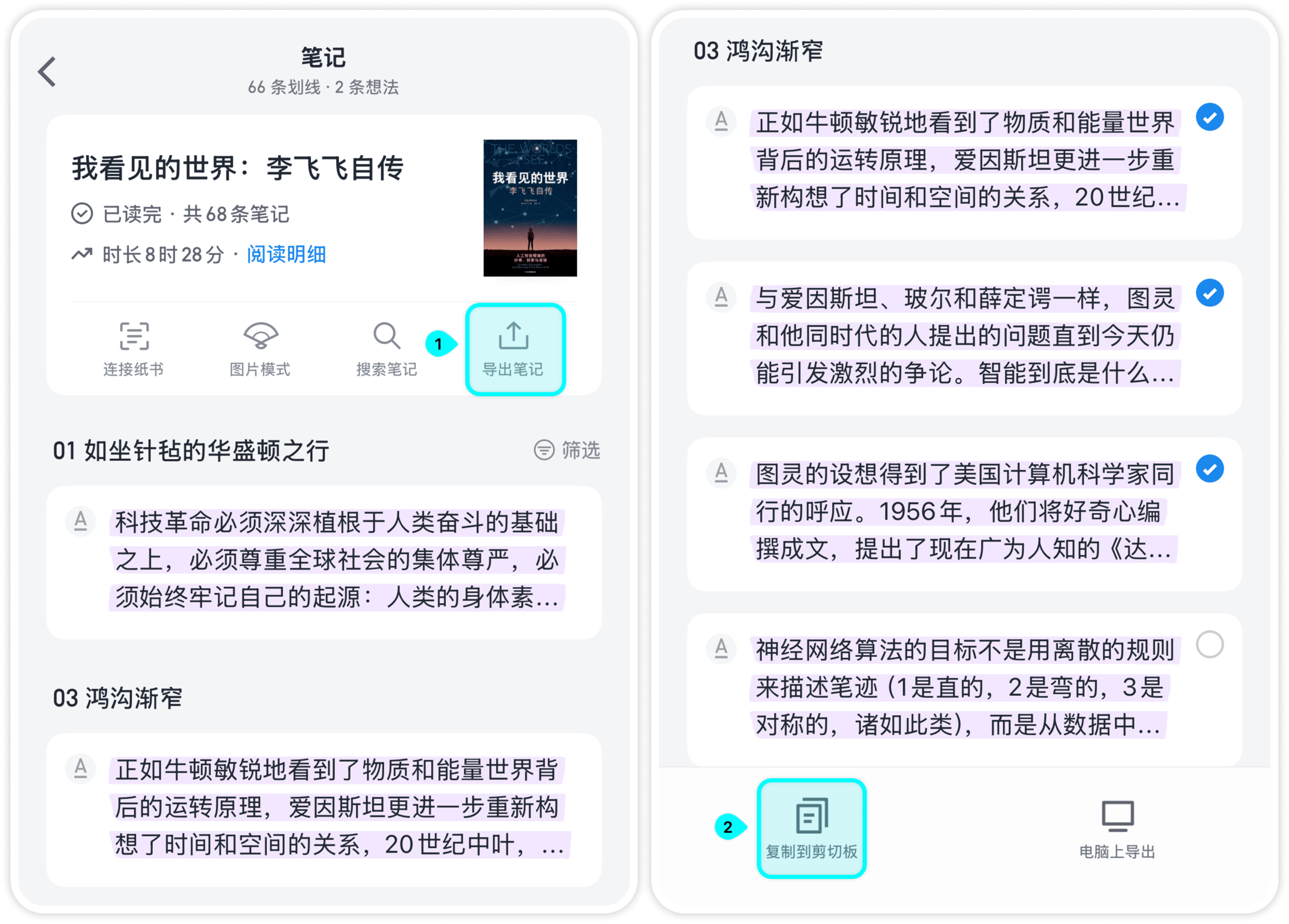
If you don’t want to connect, copy a book’s notes and paste them into Booko.
- In WeRead, open Me → Notes and choose a book.
- Tap Export notes and select the notes you want.
- Tap Copy to clipboard.
- Go back to Booko, tap the add button, paste, check the title and author, and save.
Dedao books
Copy highlights and notes from a book in Dedao, then paste them into Booko using the add button. Check the results before saving. Keep the original title, author, highlight labels, and “来自得到App” footer so Booko can recognize the export.
Douban Read
You can paste a single copied highlight or a batch export of highlights and annotations. For a single highlight, keep the “摘自” attribution and Douban Read link. For a batch export, keep the book title at the beginning and the “原文” and “批注” labels. Batch exports may omit the author; check or fill it in before saving.
iReader
Copy highlights and thoughts from iReader and paste them into Booko. Keep the dates and the “原文” and “想法” labels. The copied text usually has no title or author, so select the destination book in the import panel before saving.
Before and after importing
- Check the title and author. You can edit them during the import. When they match, Booko merges repeated imports of the same book.
- Importing twice is safe. Booko skips notes that are identical to ones it already has.
- Free plan limit. The free plan stores up to 10 books and 1,000 notes. Pro has no limit.
If an import finds nothing
This usually means the text format is not what Booko expects. Make sure the clipboard contains the note text, and try again. If it still fails, send the text to [email protected] and we will check the format.