Booko 支持导入微信读书、Apple Books、Kindle、得到、豆瓣阅读和掌阅的阅读笔记。不同平台使用连接、复制粘贴或文件导入,具体步骤见下文。 导入入口在 iPhone 和 iPad 底部栏的添加按钮里,在 Mac 上是工具栏的添加按钮。
微信读书
连接后批量导入
连接微信读书 Skill 后,Booko 读取你在微信读书里有笔记的书,你选好书就能一次导入。
- 获取 API Key,下面两种方式任选一种:
- 在微信读书 App 里打开 设置 → 微信读书 Skill,复制 API Key;
- 在电脑上打开微信读书 Skill 网页,登录微信读书账号后复制 API Key。
- 在 Booko 点添加按钮,选择 微信读书。
- 粘贴 API Key,阅读说明后确认授权。
- Booko 列出有笔记的书。选择要导入的书,点 导入。
API Key 只保存在你的设备上,不会发送给 Booko 的服务器。Booko 是独立产品,不是微信读书官方产品。断开连接会删除设备上的 API Key,已经导入的书和笔记不受影响。
导入时,Booko 可以通过微信读书查找书的封面。查找封面时,Booko 只把书名和作者发送给微信读书。
复制粘贴
不想连接的话,也可以复制一本书的笔记,再粘贴到 Booko。
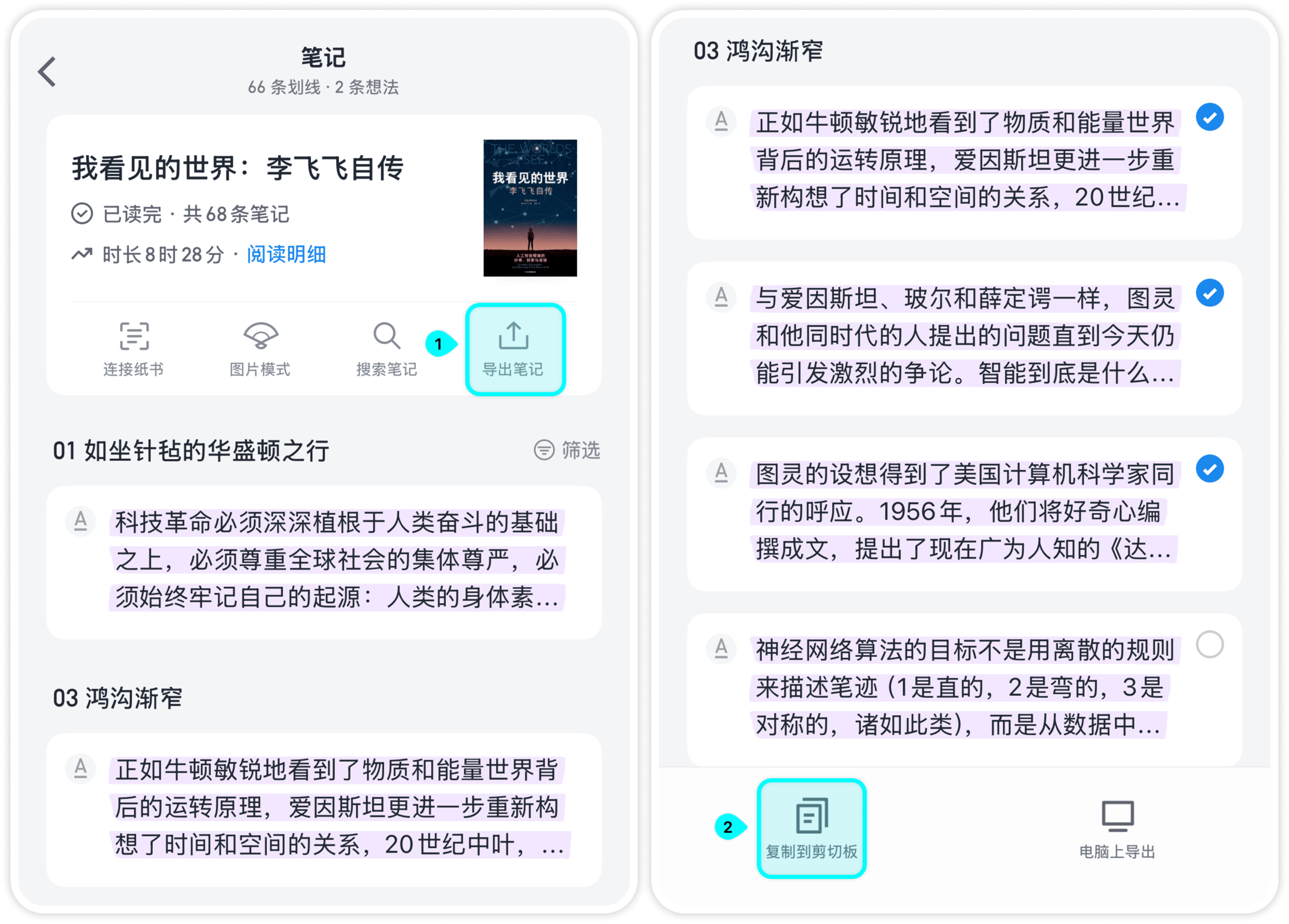
- 在微信读书打开 我 → 笔记,选择一本书。
- 点 导出笔记,选择要导出的笔记。
- 点 复制到剪切板。
- 回到 Booko,点添加按钮,粘贴笔记,确认书名和作者后保存。
Apple Books
- 在 Apple Books 打开这本书,点右下角的 ···。
- 选择 书签与高亮标记,选中要导出的高亮标记。
- 选择 分享到邮件。
- 在邮件里全选并拷贝内容。
- 回到 Booko,点添加按钮,粘贴内容后保存。
Kindle
Booko 支持两种 Kindle 笔记文件:Kindle App 导出的 HTML,以及 Kindle 设备上的 My Clippings.txt。
Kindle App:HTML
- 在 Kindle App 中打开书籍,进入笔记与标注。
- 选择分享或导出笔记本,生成 HTML 文件。
- 从分享菜单或邮件附件中把 HTML 存储到文件。
- 回到 Booko,点添加按钮,选择 Kindle → Kindle App · HTML → 选择文件,选中保存的 HTML。
在 Mac 上: 保存 Kindle 导出的 HTML 文件,在 Booko 选择 从文件导入,选中该文件。
Kindle 设备:TXT
Kindle 设备把全部标注保存在 My Clippings.txt 文件里。
在 iPhone 或 iPad 上:
- 用数据线把 Kindle 连接到电脑。
- 在 Kindle 的 documents 文件夹里找到
My Clippings.txt。 - 把文件隔空投送到 iPhone 或 iPad,选择 存储到文件。
- 在 Booko 点添加按钮,选择 Kindle,再选中刚存好的文件。
在 Mac 上: 把 Kindle 连接到 Mac,在 Booko 选择 从文件导入,选中 My Clippings.txt。
得到图书
在得到 App 中复制图书的划线与笔记,回到 Booko 点添加按钮,粘贴并检查识别结果后保存。请保留书名、作者、「原文」和「来自得到App」等原始内容,便于识别。
豆瓣阅读
支持复制单条划线,也支持粘贴批量导出的划线与批注。单条复制时,请保留「摘自」的书名、作者和豆瓣阅读链接;批量导出时,请保留开头的书名及「原文」「批注」。批量文本可能不含作者,请在保存前补充或确认。
掌阅(iReader)
在掌阅复制划线与想法,回到 Booko 粘贴。请保留日期和「原文」「想法」。掌阅的复制文本通常不带书名和作者,需要在导入面板中选择归属书籍,再保存。
导入前后
- 检查书名和作者:导入时可以修改。书名和作者对上后,同一本书导入多次,笔记会合并到这本书下。
- 重复导入:Booko 跳过完全相同的笔记,不会产生重复。
- 免费版额度:免费版最多保存 10 本书和 1000 条笔记,升级 Pro 后没有限制。
导入失败怎么办
如果 Booko 没有识别出笔记,通常是文本格式和预期不一致。请先确认剪贴板里确实是笔记文本,再试一次。还是不行的话,把这段文本发到 [email protected],我们会检查格式。